Cut films as a pair with AI.
Pick the folder with your trip photos and videos, tell the AI what kind of film you want, and get a first cut back. Then watch it and leave notes, the way you would for a friend who edits. Works with Claude or ChatGPT on the plan you already have, or with Qwen on your own computer.
From a folder to a film in four steps.
You choose the footage and say what you want. The AI does the tedious part. You watch, comment, and it tries again. Every version is saved, so changing your mind costs nothing.
Pick a folder
Paircut reads your photos and videos where they are and sorts them by the day they were shot. Nothing gets copied or changed.
Describe the film
Length, mood, what the trip was about, whether you want music. Two sentences are plenty. You can star the shots you can’t do without, but you don’t have to.
AI builds it
Clips, chapters, captions and transitions land on the storyboard. In our runs, a week of footage took Claude two to five minutes.
Give notes
Press C on a moment and write what bothers you, or just ask in the chat. Whatever you changed by hand stays put. Render when you’re happy.
Five real runs, start to finish.
Recorded in Paircut with Claude on 194 clips from a week in Kyrgyzstan. Nothing is staged. Where Claude worked for minutes, the video speeds up and shows how long it really took.
Why I built it. I came back from six days in Peru’s Cordillera Huayhuash with 789 phone clips and photos, and no wish to spend a month in an editor. Paircut started as a way to hand the tedious part to Claude and keep the decisions for myself. Since then it has cut a second trip, a week in Kyrgyzstan, which is the footage you see on this page.
Notes, the way you’d give them to a person.
Leave a comment on a moment, on a card or on the whole film. Paircut collects them, the AI works through all of them in the next round and tells you what it changed. If you moved something by hand, it stays where you put it.
“Hold the glacier a bit longer, then cut on the gust of wind.”
The card gets retimed.
“Even out the sound. The wind drowns my voice on day 2.”
Speech is leveled, sudden noise dipped, wind removal turned on.
“Find calm music we’re free to use, and credit the author.”
Tracks under free licenses go under the storyboard, quieter when someone talks.
“Make it a bit warmer, like evening light.”
The whole film gets a warmer look.
“Fewer camp shots, more of the pass. Cut the climb to the beat.”
That part is rebuilt; the rest stays as it was.
“Animated map of the route from the GPS tracks.”
The map is made and dropped into the slot.
It can also check the cut for flash frames, jump cuts and dark or blurry shots, add captions and subtitles, or rebuild everything to a new length. And if you ever want to finish the film in DaVinci Resolve, it exports the project for you.
The parts most trip films skip.
A route map, music you’re allowed to use, even sound, subtitles. They make a film feel finished, and they’re exactly what nobody has time for after a trip.
A first cut from a week of footage
UsuallyDays of watching, picking and ordering clips.
With PaircutTwo sentences about the film. In our runs, 194 clips became a first cut in two to five minutes.
An animated route map
UsuallyGPS export, a map tool, then keyframes in After Effects.
With PaircutOne line in an empty slot. Claude read the watch’s GPS files and drew the route itself.
Music you’re allowed to use
UsuallyHours on stock sites, license fine print, cutting to the beat by hand.
With PaircutAsk for a mood. You get tracks under free licenses with the author credited, and the cuts can follow the beat.
Sound across 200 clips
UsuallyRiding levels clip by clip, and wind in every outdoor shot.
With PaircutOne message evens out speech, dips sudden noise, removes wind and keeps music down while someone talks.
Subtitles
UsuallyTyping out what people say and timing every line.
With PaircutWhisper transcribes speech on your computer, and subtitles come straight from it.
Finding the shot
UsuallyScrubbing through hours of footage to find that one moment.
With PaircutEvery shot gets a short description on your own computer, so you can just search for “cows by the lake”.
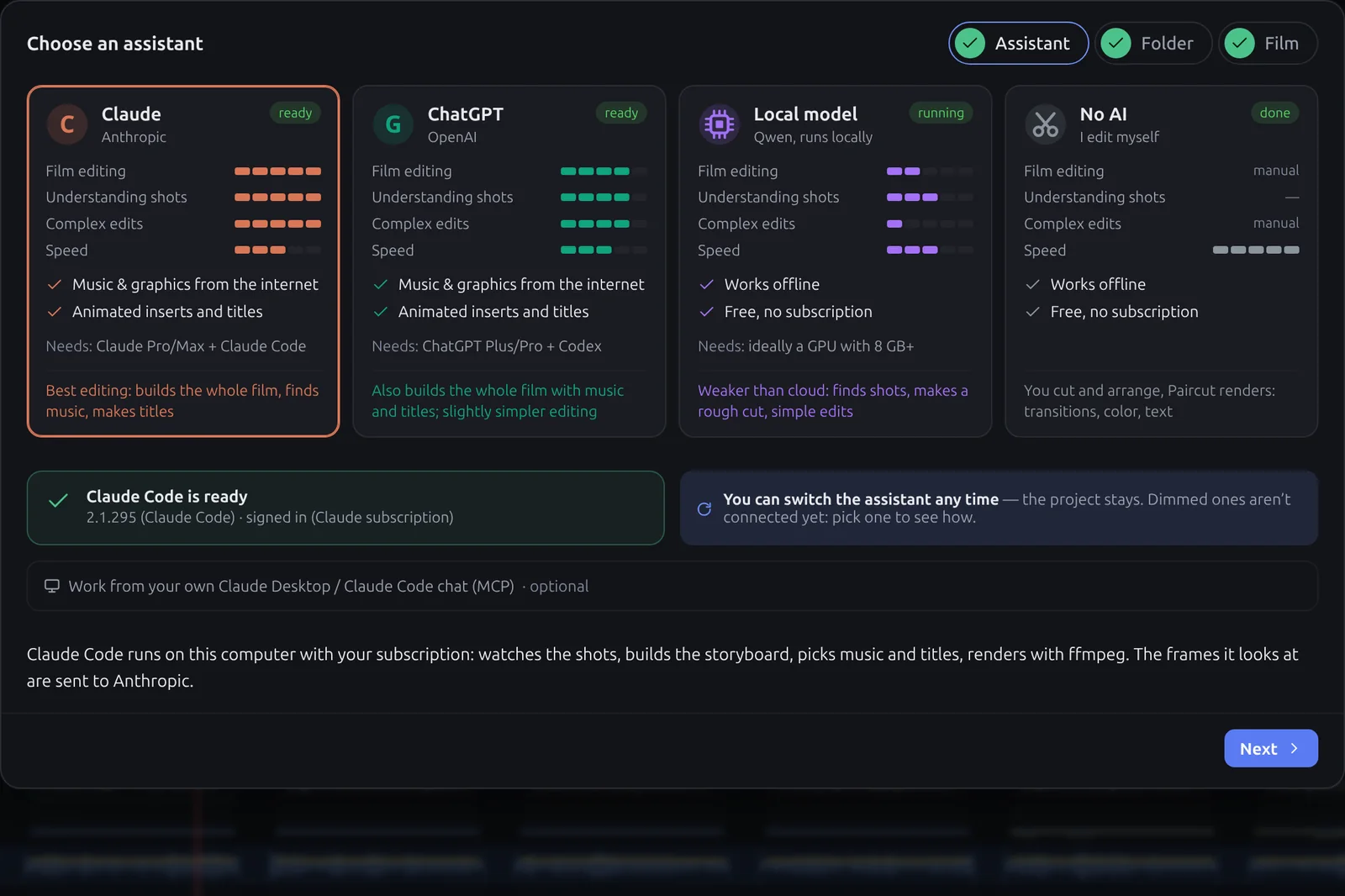
Claude, ChatGPT, or a model on your own computer.
Paircut is the editing desk; who works at it with you is your call. Claude and ChatGPT do everything, from the first cut to maps and music, on the plan you already have. Qwen runs on your own computer, free and offline, and handles the simpler jobs. Or skip AI and use Paircut as a plain editor with a built-in renderer. You can switch at any time.
Already working in Claude Desktop or Claude Code?
Paircut is also an MCP server. Connect it once from the settings, and your agent can browse the open project, look at frames, search the footage, edit the storyboard and start renders. You watch the changes appear in Paircut as they happen.
No API bill.
AI tools usually pay for the model by the token and pass that cost on. Paircut doesn’t use the API at all. It runs Claude Code or Codex under your own Claude or ChatGPT plan, so editing a film is part of a subscription you already pay for. A local Qwen model costs nothing.
What our Huayhuash film would have cost per token: 50 Claude runs, from the first cut to version 30. Every extra round of notes adds to the bill.
The same runs go through your subscription. Nothing is billed per token; the work counts toward your plan’s usage limits. Claude Pro is $20 a month, so one film through the API would cost more than a whole month of the plan.
Runs on your own GPU or CPU. No account and no usage limits; once the model is downloaded, it works without the internet.
$32 is the API-equivalent cost Claude Code itself reported for those 50 runs. Claude Max, with 5× or 20× the usage of Pro, is $100 or $200 a month; long edits reach the limits of smaller plans sooner. Prices as of October 2026.
Why it runs Claude Code and Codex instead of calling an API
A round of notes that keeps Claude busy for twenty minutes doesn’t add a cent to your bill.
You sign in to the official apps with your plan. If an API key is set on your computer, Paircut asks once which to bill, so nothing goes to the API by surprise.
Claude Code and Codex can run commands and write code. That’s how a GPS track turns into an animated map and a storyboard into a rendered film.
When Anthropic or OpenAI ship a better model, it shows up in Paircut with your plan. Conversations continue where they left off.
Everything on one screen.
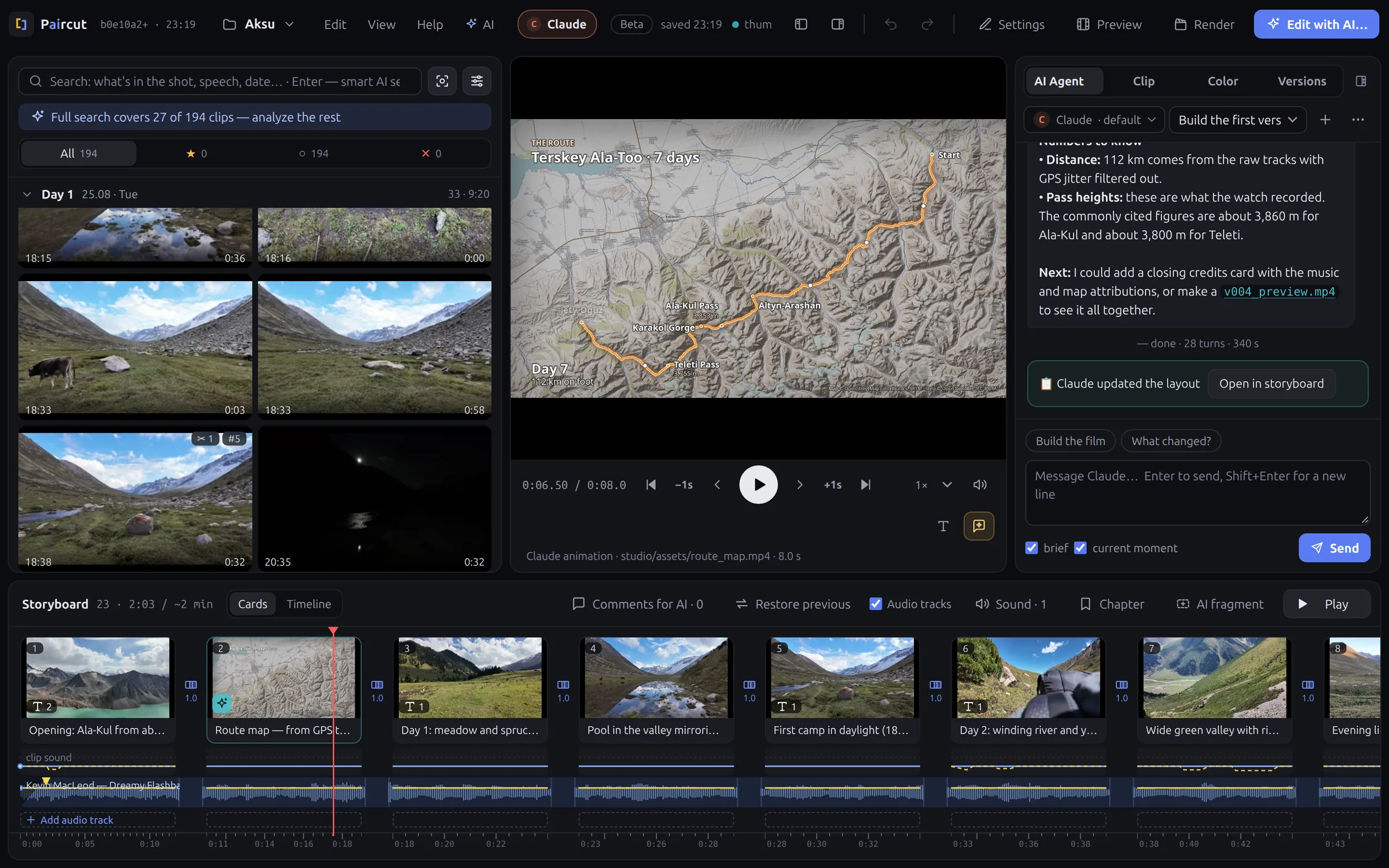
Footage on the left, sorted by day. The player in the middle, the AI chat on the right, and the film along the bottom with its sound tracks.
The small things that matter when you edit.
Your order or the AI’s
Lay out a few cards yourself and say whether the AI should keep them exactly, treat them as anchors, or just take the hint. Leave an empty slot like “30 s of lake views” and it fills it.
Pieces you choose
Mark In and Out on a clip, exactly or roughly, and the AI uses that piece instead of guessing.
Every version kept
Each round with the AI is saved as v001, v002… If the new cut is worse, go back in one click.
Transitions that ease
Dissolves, wipes and slides with real easing curves, set for one cut or the whole film.
Smooth on a laptop
4K from phones, drones and action cams gets small proxies in the background, starting with the clip you open.
Keys for everything
Rate, cut, add to the storyboard, comment and play from the keyboard. A day of footage goes fast that way.
One look for the whole film.
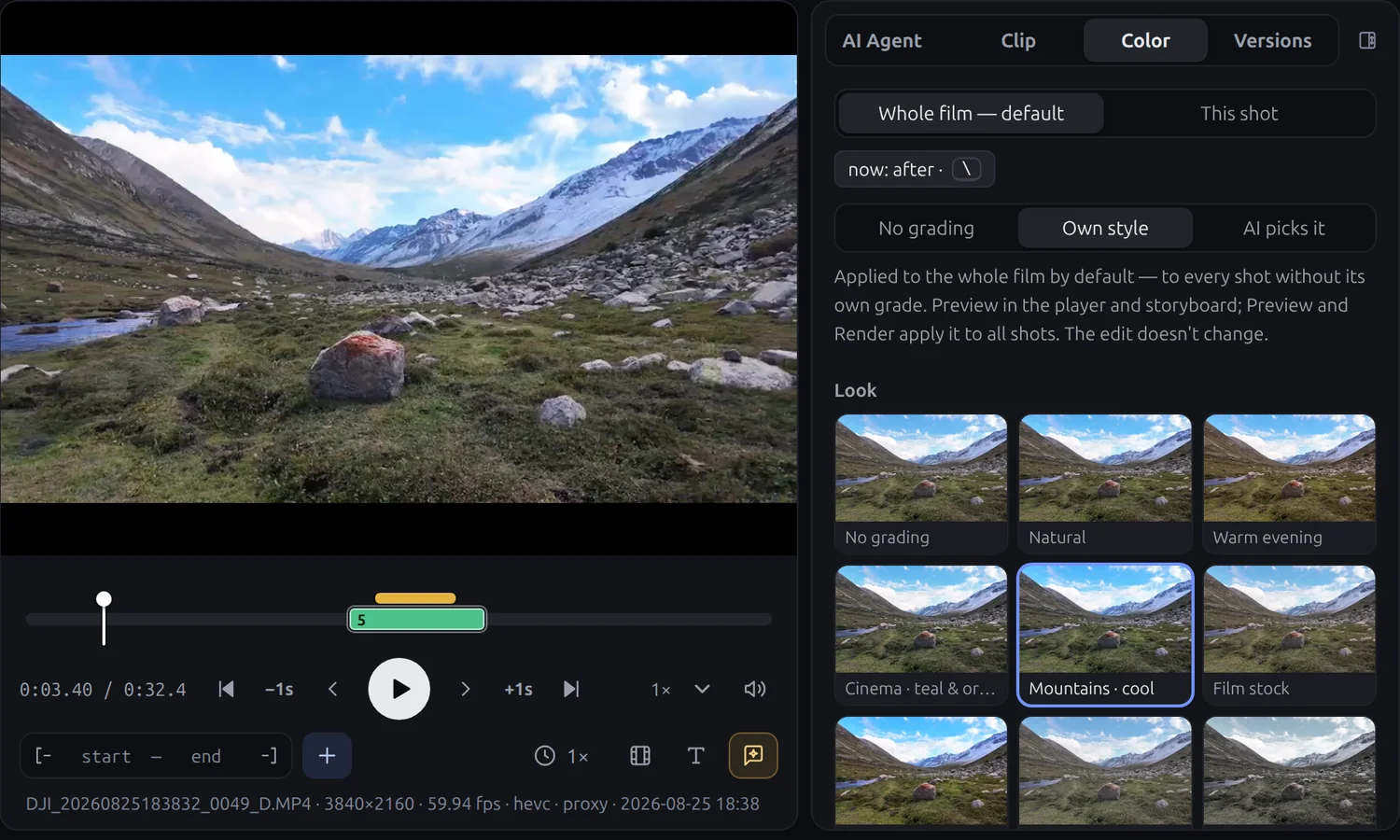
Pick a look and how strong it should be. Paircut evens out exposure and white balance between cameras, so a phone shot can sit next to an action-cam shot without a jump. What you see in the player is what gets rendered. Press \ to see the original.
Or let the AI pick the look for you, or give one shot its own.
Your footage stays on your disk.
Paircut runs on your computer. There’s no account, nothing is uploaded to us, and nothing tracks you.
Stays on your computer
- Your source files. Paircut only reads them and never changes them.
- Everything Paircut makes, in a
_paircutfolder next to your footage: marks, versions, proxies, renders. - All video processing. Proxies, previews and final renders are made by ffmpeg on your machine.
Goes to the AI you choose
- With Claude or ChatGPT, under your own account: the brief, your messages, and the frames the agent chooses to look at. Not your video files. With local Qwen, nothing leaves the computer at all.
- Your originals are off limits. The agent can’t change or move them, not even with a shell command.
Get the beta.
ffmpeg is built into every download. Free during the beta.
macOS
Apple Silicon or Intel. Not signed yet: on first launch, open System Settings → Privacy & Security and choose Open Anyway.
Windows
64-bit Windows. Not signed yet: if SmartScreen stops it, choose More info → Run anyway.
Linux
64-bit, one file for most distributions. Make it executable and run it; it opens in a Chrome or Chromium app window if you have one. On Ubuntu 24.04 you may need libfuse2t64.
chmod +x Paircut-linux-x86_64.AppImage
./Paircut-linux-x86_64.AppImage
Then pick your AI
Claude Code, signed in to your Pro or Max plan.
curl -fsSL https://claude.ai/install.sh | bash
Codex CLI, signed in with your ChatGPT account.
npm install -g @openai/codex
Nothing to install up front: download a model in Paircut’s Local model window.
Questions
Does Paircut upload my footage?
No. Your video stays on your disk and all processing happens locally with ffmpeg. With Claude or ChatGPT, the agent sends the text of the brief and your messages, plus any frames it chooses to inspect. With local Qwen, nothing is sent anywhere.
Do I need an API key?
No. Paircut uses Claude Code or Codex signed in to your own Claude or ChatGPT account, so the work goes through your plan instead of a per-token API bill. A local Qwen model needs no account at all.
Which AI should I pick?
If you have a Claude or ChatGPT plan, use it. That gets you the whole thing: the first cut, rounds of notes, maps, titles, music, renders. Qwen is for working offline or for free. It describes shots, finds footage and makes a rough cut, and it leaves anything that needs the internet, like a map or a photo, for Claude or ChatGPT.
Can I work from Claude Desktop or Claude Code?
Yes. Paircut is also an MCP server: connect it from Paircut’s settings, and your agent can browse the open project, look at frames, edit the storyboard and start renders while you watch the changes in Paircut.
Does it replace Premiere or DaVinci Resolve?
No, and it isn’t trying to. Premiere and Resolve are professional editors, and Resolve Studio can now be driven by an AI assistant too, if you already know your way around it. Paircut is for everyone else: a folder of trip footage in, a finished film out, no editing skills needed. Want professional finishing later? Choose AI → Export to DaVinci Resolve: Claude or ChatGPT writes an FCPXML of your storyboard with the clips, cuts, transitions, titles and music, made to import into Resolve, the free version too.
What footage does it work with?
Anything ffmpeg can read: phones, drones, action cameras and photos. Capture time comes from EXIF data and from file names such as Pixel and DJI ones, and you can set the time zone of the shoot so days split correctly.
Why “Paircut”?
Because you and the AI cut the film together, as a pair. And yes, there’s an AI right in the middle of the name.